Imagine a world where you could automate customer support responses on X (formerly Twitter), analyze real-time sentiment around a new product launch, or even build a bot that curates and shares specific news relevant to your niche. This isn't science fiction; it's the tangible power of Understanding Twitter API for Code Generation. For developers, data scientists, and anyone keen to move beyond manual interactions, the Twitter API unlocks a universe of programmatic possibilities, transforming a social platform into a rich data source and an automation playground.
At a Glance: Your Quick Start Guide to Twitter API Programmatic Interactions
- What it is: The Twitter API (Application Programming Interface) is a set of rules and protocols allowing software applications to communicate with the Twitter platform.
- Why use it: Automate tasks, collect data, analyze trends, build custom applications, or enhance user experiences.
- Key tools: Python is excellent for this, especially with the
tweepylibrary. - Access essentials: You'll need a Twitter Developer account and API keys (consumer key, consumer secret, access token, access token secret) for authentication.
- Authentication: Uses OAuth to verify your application's identity and permissions.
- Common tasks: Retrieving tweets, posting new tweets, accessing user profiles, real-time streaming.
- Crucial considerations: Rate limits (how many requests you can make), robust error handling, secure storage of API keys (environment variables), and adhering to Twitter's ethical guidelines.
- Data challenges: Raw data often requires parsing and cleaning to be useful.
Why Bother? The Power of Programmatic Twitter
In an increasingly data-driven world, the ability to interact programmatically with social media platforms is no longer a luxury but a strategic advantage. For X, a platform teeming with real-time conversations, trends, and public sentiment, the API is the key that unlocks this vast ocean of information.
Think beyond simply tweeting. With the Twitter API, you can:
- Conduct in-depth market research: Track brand mentions, competitor activity, and emerging industry trends.
- Automate engagement: Schedule posts, auto-reply to specific queries, or set up notification systems.
- Build innovative applications: Create specialized news feeds, sentiment analysis tools, or even a Twitter code generator app for developers to quickly scaffold common interactions.
- Gather data for machine learning: Train models on public tweet data for natural language processing (NLP) or predictive analytics.
- Monitor events in real-time: Follow breaking news, public reactions to events, or crisis communications as they unfold.
This isn't just about efficiency; it's about gaining insights and capabilities that are impossible through manual browsing.
The Twitter API: Your Digital Bridge to X
At its core, the Twitter API is a standardized way for your code to "talk" to Twitter's servers. It defines a series of "endpoints"—specific URLs that, when requested, perform an action or return data. For instance, there's an endpoint to retrieve a user's latest tweets, another to post a new tweet, and yet another to search for tweets containing a specific hashtag.
Historically, Twitter has offered various API versions, with API v2 now being the primary and most comprehensive offering, providing access to a wider range of data and features. While some older endpoints might still exist, focusing on v2 ensures you're working with the most up-to-date and robust capabilities.
Getting Your Hands Dirty: Setting Up Your Developer Environment
Before your code can start making friends with Twitter, you need a few prerequisites in place.
Step 1: The Twitter Developer Account & API Keys
Think of your API keys as the credentials your application uses to identify itself and prove it has permission to interact with Twitter. Without them, your requests will be rejected.
- Create a Twitter Developer Account: Head over to the Twitter Developer Portal (developer.twitter.com) and sign up. This typically involves applying for a developer account, which might require detailing your intended use case. Be honest and thorough; it helps speed up approval.
- Create a Project and App: Once approved, you'll create a "Project" and then an "App" within that project. Each app gets its own set of keys.
- Obtain Your Keys: For your application, you'll primarily need:
- Consumer Key (API Key)
- Consumer Secret (API Secret Key)
- Access Token
- Access Token Secret
Crucial Security Note: These keys are like the master key to your Twitter application. Never share them publicly, commit them directly to version control (like Git), or hardcode them into your scripts. We'll discuss secure storage later.
Step 2: Choosing Your Weapon (Python & tweepy)
While you can interact with the Twitter API using almost any programming language capable of making HTTP requests, Python stands out as a top choice due to its readability, vast ecosystem of libraries, and strong community support.
For interacting with the Twitter API in Python, tweepy is the de facto standard. It's a powerful, user-friendly library that abstracts away much of the complexity of direct API calls, letting you focus on what you want to achieve rather than the low-level HTTP mechanics.
Installation is a breeze:
bash
pip install tweepy
That's it! You're ready to start coding.
Authenticating Your Application: Opening the Gates
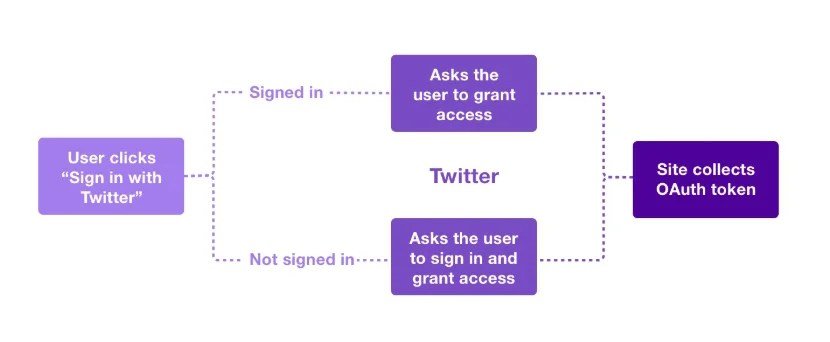
Authentication is the process by which your application proves its identity to Twitter. The Twitter API uses an industry-standard protocol called OAuth (specifically, OAuth 1.0a or OAuth 2.0, depending on the endpoint and access level). tweepy simplifies this process significantly.
Here's how you typically authenticate with tweepy:
python
import tweepy
import os # For securely accessing environment variables
It's best practice to store your keys in environment variables
For demonstration, we'll show them here, but DO NOT do this in production code!
CONSUMER_KEY = os.environ.get("TWITTER_CONSUMER_KEY")
CONSUMER_SECRET = os.environ.get("TWITTER_CONSUMER_SECRET")
ACCESS_TOKEN = os.environ.get("TWITTER_ACCESS_TOKEN")
ACCESS_TOKEN_SECRET = os.environ.get("TWITTER_ACCESS_TOKEN_SECRET")
REPLACE THESE WITH YOUR ACTUAL KEYS (for local testing ONLY, then use environment variables!)
CONSUMER_KEY = "YOUR_CONSUMER_KEY"
CONSUMER_SECRET = "YOUR_CONSUMER_SECRET"
ACCESS_TOKEN = "YOUR_ACCESS_TOKEN"
ACCESS_TOKEN_SECRET = "YOUR_ACCESS_TOKEN_SECRET"
try:
Authenticate to Twitter
auth = tweepy.OAuthHandler(CONSUMER_KEY, CONSUMER_SECRET)
auth.set_access_token(ACCESS_TOKEN, ACCESS_TOKEN_SECRET)
Create API object
wait_on_rate_limit=True makes tweepy automatically wait when you hit rate limits
api = tweepy.API(auth, wait_on_rate_limit=True)
print("Authentication successful!")
except tweepy.TweepyException as e:
print(f"Error during authentication: {e}")
Handle specific authentication errors if needed
if "401" in str(e): # Example for invalid credentials
print("Please check your API keys and tokens.")
exit() # Exit if authentication fails, as further actions won't work
By setting wait_on_rate_limit=True, you instruct tweepy to automatically pause your program if you hit Twitter's rate limits (more on this in a moment) and resume when the limits reset. This is a lifesaver for long-running scripts.
Making Your First API Calls: From Theory to Tweet
Once authenticated, the api object becomes your gateway to interacting with Twitter. Let's look at a couple of common actions.
Retrieving Tweets from a Specific User
Want to fetch the latest tweets from a public profile? It's straightforward:
python
Assuming 'api' object is already authenticated from the previous step
username = "elonmusk" # Example username
tweet_count = 5
try:
Retrieve the specified number of tweets from the user's timeline
tweets = api.user_timeline(screen_name=username, count=tweet_count)
print(f"\nLatest {tweet_count} tweets from @{username}:")
for tweet in tweets:
print(f"- ID: {tweet.id}")
print(f" Text: {tweet.text}")
print(f" Created: {tweet.created_at}")
print("-" * 20)
except tweepy.TweepyException as e:
print(f"Error retrieving tweets: {e}")
The tweet object returned by tweepy is rich with data, including the tweet's ID, text, creation timestamp, author information, retweet count, like count, and much more. You can explore dir(tweet) in your console to see all available attributes.
Posting a New Tweet
Programmatically tweeting can be useful for automated updates, alerts, or scheduled content.
python
Assuming 'api' object is already authenticated
tweet_text = "Hello from my Python script using the Twitter API! #Python #TwitterAPI"
try:
Post the tweet
new_tweet = api.update_status(tweet_text)
print(f"\nSuccessfully posted tweet!")
print(f"Tweet ID: {new_tweet.id}")
print(f"Tweet URL: https://twitter.com/{new_tweet.user.screen_name}/status/{new_tweet.id}")
except tweepy.TweepyException as e:
print(f"Error posting tweet: {e}")
if "187" in str(e): # Example error code for duplicate tweet
print("This tweet is a duplicate of a recent tweet. Try a different message.")
Remember to be mindful of Twitter's rules regarding automated posting to avoid spamming.
Navigating the Nuances: Rate Limits, Streaming & Error Handling
Interacting with any external API, especially one as heavily trafficked as Twitter's, requires understanding certain operational realities.
Rate Limits: The API's Traffic Cop
To prevent abuse and ensure fair access for all developers, Twitter imposes rate limits. This means you can only make a certain number of requests within a specific time window (e.g., 900 requests per 15 minutes for some endpoints). Exceeding these limits will result in your requests being temporarily blocked.
As mentioned, tweepy's wait_on_rate_limit=True parameter is incredibly useful here. It makes your script automatically pause and wait when a limit is hit, then resume once the window resets. Without this, your program would simply crash with an error.
You can also check your current rate limit status programmatically using api.rate_limit_status() to get a detailed breakdown of your remaining requests for various endpoint groups.
Real-time Insights with the Streaming API
For scenarios requiring instantaneous data—like monitoring breaking news, tracking mentions of a specific hashtag as they happen, or building a live sentiment dashboard—the Twitter Streaming API is invaluable. Unlike the REST API, which you "pull" data from in batches, the Streaming API "pushes" data to you in real-time as events occur.tweepy provides robust support for the Streaming API through the Stream and StreamListener classes. You define a listener object that handles incoming tweets, deletions, and other events.
python
A simplified example of setting up a stream listener
(Full implementation involves more setup, including error handling and connection management)
from tweepy import Stream, StreamListener # In tweepy v4+, use tweepy.StreamingClient
This example uses the older StreamListener which is conceptually simpler for a quick demo.
For new projects, use tweepy.StreamingClient which supports API v2.
class MyStreamListener(tweepy.StreamListener):
def on_status(self, status):
print(f"New tweet: {status.text}")
def on_error(self, status_code):
print(f"Error during streaming: {status_code}")
if status_code == 420:
# returning False in on_error disconnects the stream
return False
myStreamListener = MyStreamListener()
myStream = tweepy.Stream(auth=api.auth, listener=myStreamListener)
# Filter the stream to track specific keywords
myStream.filter(track=['Python', 'AI'])
The streaming API is powerful for real-time analytics but also requires careful resource management and a solid understanding of how to process a continuous flow of data.
Robustness is Key: Error Handling Strategies
Things can, and will, go wrong when interacting with external services. Network issues, invalid requests, rate limits, or Twitter server problems can all lead to errors. Implementing robust error handling is crucial for creating reliable applications.tweepy raises tweepy.TweepyException (or subclasses like tweepy.errors.Forbidden for authentication issues) when API requests fail. You should always wrap your API calls in try...except blocks to gracefully handle these situations.
python
try:
Attempt an API call that might fail, e.g., fetching a non-existent user
user_info = api.get_user(screen_name="this_user_does_not_exist_12345")
print(user_info.name)
except tweepy.NotFound: # Specific exception for a 404 Not Found error
print("User not found!")
except tweepy.TweepyException as e:
print(f"An unexpected error occurred: {e}")
You can inspect e.response.status_code for HTTP status codes
and e.response.text for more details from Twitter's API
Good error handling prevents your script from crashing, allows you to log issues, and potentially retry failed requests after a delay.
The Data Deluge: Parsing, Cleaning, and Making Sense of It All
Raw tweet data, while rich, often isn't immediately usable for analysis or display. It frequently contains:
- Mentions (
@username): References to other users. - Hashtags (
#topic): Categorical labels. - URLs (
https://t.co/...): Shortened links. - Special characters & emojis: Unicode characters that might need normalization or removal depending on your analysis.
- Retweet prefixes (
RT @username:): Common in retweeted content.
Cleaning and parsing this data is a crucial step for accurate analysis. Python's built-in string methods and there(regular expressions) module are your best friends here.
python
import re
def clean_tweet_text(text):
"""
Removes URLs, mentions, hashtags, and leading/trailing whitespace from tweet text.
"""
Remove URLs
text = re.sub(r"http\S+|www\S+|https\S+", "", text, flags=re.MULTILINE)
Remove user mentions
text = re.sub(r"@\w+", "", text)
Remove hashtags (optional, depends on if you want to keep them for other analysis)
text = re.sub(r"#\w+", "", text)
Remove retweet indicator "RT"
text = re.sub(r"RT[\s]+", "", text)
Remove extra whitespace
text = re.sub(r"\s+", " ", text).strip()
return text
Example usage
sample_tweet = "RT @elonmusk: Just launched a new rocket! 🚀 #SpaceX #Innovation Check it out: https://t.co/example"
cleaned_tweet = clean_tweet_text(sample_tweet)
print(f"Original: {sample_tweet}")
print(f"Cleaned: {cleaned_tweet}")
For more complex NLP tasks, you might integrate libraries like NLTK or spaCy after initial cleaning to perform tokenization, stemming, lemmatization, or sentiment analysis.
Security & Ethics: Building Responsibly
Interacting with a platform like X demands a strong sense of responsibility, both for your application's security and for the ethical implications of your data collection and usage.
Safeguarding Your Keys: The Environment Variable Approach
Hardcoding your API keys directly into your script is a major security vulnerability. If your code is ever shared (e.g., on GitHub), those keys become public, allowing anyone to impersonate your application.
The recommended best practice is to store your keys as environment variables. Python's os module makes accessing them trivial:
- Set environment variables in your operating system (e.g.,
export TWITTER_CONSUMER_KEY="your_key_here"in Linux/macOS, or via System Properties in Windows). For production deployments, cloud providers have their own secure methods for managing secrets. - Access them in your Python script:
python
import os
CONSUMER_KEY = os.getenv("TWITTER_CONSUMER_KEY")
CONSUMER_SECRET = os.getenv("TWITTER_CONSUMER_SECRET")
ACCESS_TOKEN = os.getenv("TWITTER_ACCESS_TOKEN")
ACCESS_TOKEN_SECRET = os.getenv("TWITTER_ACCESS_TOKEN_SECRET")
if not all([CONSUMER_KEY, CONSUMER_SECRET, ACCESS_TOKEN, ACCESS_TOKEN_SECRET]):
print("Error: Twitter API keys not found in environment variables.")
print("Please set TWITTER_CONSUMER_KEY, TWITTER_CONSUMER_SECRET, TWITTER_ACCESS_TOKEN, and TWITTER_ACCESS_TOKEN_SECRET.")
exit()
This keeps your sensitive credentials out of your codebase, making your application more secure.
Respecting the Platform: Terms of Service and Ethical Guidelines
Twitter (and X) is a public platform, but it has strict rules. When using the API:
- Review the Developer Terms of Use: Always understand what you can and cannot do with the API and the data you collect. Violation can lead to your developer account being suspended or revoked.
- Respect user privacy: Even if data is public, consider the ethical implications of collecting, storing, and analyzing it. Anonymize data where possible, and never attempt to re-identify users from anonymized datasets.
- Avoid malicious purposes: Do not use the API for spamming, harassment, impersonation, or any activity that violates the platform's user guidelines.
- Data Retention: Be mindful of how long you store data and whether your retention policies align with Twitter's guidelines and relevant data protection regulations (e.g., GDPR, CCPA).
- Transparency: If you're building a bot, it's often a good practice to indicate that it's an automated account (e.g., in its profile bio).
Building powerful applications with the Twitter API also means building them responsibly.
Beyond the Basics: Advanced Horizons & Next Steps
This article has provided a solid foundation, but the Twitter API's capabilities extend much further. As you become more comfortable, you might explore:
- Advanced Search Queries: Constructing complex queries to filter tweets by date, language, location, specific users, or sentiment.
- Media Uploads: Attaching images or videos to your programmatic tweets.
- Direct Messages: Sending and receiving direct messages (with appropriate permissions).
- User Management: Following/unfollowing users, blocking/unblocking, and retrieving detailed user profiles.
- Using other API versions/endpoints: While v2 is primary, understanding when to use specific v1.1 endpoints for niche features can be helpful.
- Integrating with data science tools: Leveraging libraries like
pandasfor data manipulation,matplotliborseabornfor visualization, andscikit-learnfor machine learning on your collected tweet data.
The ecosystem around the Twitter API is vast, offering continuous learning opportunities for those willing to dive deeper.
Common Questions Developers Ask
Navigating any new API brings its share of questions. Here are some common ones that arise when exploring the Twitter API for code generation:
Is the Twitter API free to use?
Access to the Twitter API has evolved. While there used to be generous free tiers, X has refined its access policies. Currently, there are free, basic, and pro tiers, each with different rate limits, feature sets, and pricing. You'll generally need a paid subscription to access significant volumes of data or advanced features. Always check the official Twitter Developer Portal for the most up-to-date pricing and access tiers relevant to your project's needs.
How do I choose between different API versions?
Twitter API v2 is the recommended and most current version, offering modern features and better performance. For new projects, you should almost always start with v2. Older API v1.1 endpoints might still exist for legacy reasons or very specific functionalities not yet fully migrated to v2, but they are generally less feature-rich and may eventually be deprecated. tweepy primarily supports v1.1 for many functions but also offers access to v2 endpoints. Check tweepy's documentation for specific v2 implementations, often through client = tweepy.Client(...) for direct v2 access.
What are common pitfalls to avoid when building with the Twitter API?
- Ignoring Rate Limits: Not using
wait_on_rate_limit=Trueor manually managing limits will lead to frequent program interruptions. - Hardcoding API Keys: A massive security risk. Always use environment variables or a secure configuration management system.
- Insufficient Error Handling: Failing to wrap API calls in
try...exceptblocks makes your application fragile. - Overlooking Terms of Service: Not reading the developer agreement can lead to account suspension. Understand what constitutes acceptable use.
- Data Overload: Collecting too much data without a clear purpose can be inefficient and lead to storage/processing challenges. Start small and scale up.
- Encoding Issues: Tweets can contain a wide array of characters and emojis. Ensure your program handles UTF-8 encoding correctly to avoid
UnicodeEncodeErroror display issues.
Your Journey Continues: Crafting Intelligent Interactions
Mastering programmatic interaction with the Twitter API is a skill that opens doors to a myriad of possibilities, from data analysis to content automation. By leveraging Python and tweepy, you're equipped with powerful tools to tap into the real-time pulse of public conversation.
Remember, the journey from understanding the API's mechanisms to building sophisticated, robust applications is iterative. Start with simple scripts, understand the data structures, get comfortable with authentication and error handling, and then gradually expand your ambitions. The digital conversation waits for no one, and with the Twitter API in your toolkit, you're now ready to join in, analyze, and even shape it, one intelligent interaction at a time.